Developer Guide
Database Design
There are minor tables which are Courts, Hand, Position, Country, Gender, Season. Also, there are major tables which use the information provided by these minor tables. These major tables are Player, Team, Coach, Statistics, Transfers, Match. Minor tables are referenced as foreign keys to necessary corresponding columns of major tables. PostgreSQL is used to manage the database in this project.
Detailed database relations can be seen in the figure 2.1
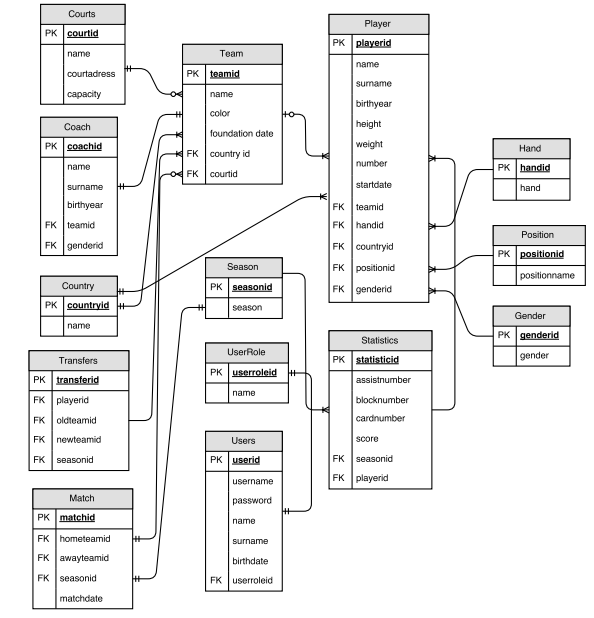
Database Entity Relation Diagram
We have also user operations in our database design, it is seen in database diagram above. There are 3 tables to handle user operations in database which are usertable, userinformation and userrole. Login information, username and password, are kept in usertable and also it has reference from userrole to specify user role. User roles are kept in userrole table, when we initialize database there are two main roles; user and admin. Roles can be added manually from postgresql interface there is no interface for adding new role in our site design. Additional user information which are name, last name, birthdate etc. are kept in userinformation table. When a new user is registered information that he/she writes goes to this table.
Code
We used Python and PostgreSQL to build our project. We used Flask which is a microframework for Python based web applications. We used python psycopg2 to handle database operations, psycopg2 is a framework for connecting and executing queries on PostgreSQL database. Finally we used Spphinx for documentation.
Our project structure is consist of two modules one of them is main project module and the other one is admin module You can see the project structure below;
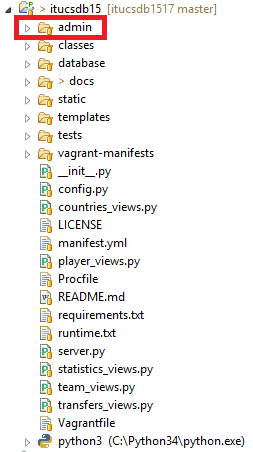
Project Structure
- Admin module is shown in red box, this is the admin module and the whole project is another module. We used Blueprint
- to divide project into modules.
The code below is added to admin module server.py
admin = Blueprint('admin', __name__,template_folder='templates/')
and the code below added to config.py in the main project module
app.register_blueprint(admin.admin, url_prefix='/admin')
These two lines divides project into modules and register modules into the main project.
The main reason we divide project into 2 modules is security. We made admin operations under one folder, and user operations in main project module.
We used multiple source code files in main module thanks to config.py. We wrote our main codes into the config.py and gave references to other files.
app = Flask(__name__)
And also we wrote login_required function nto the config.py since it is used every source code file in main module.
Main code file of our project is server.py in itucsdb15 module(main module) It includes home_page, rules_page, login_page, logout, init_db, rules_pages and main function are defined in here.
if __name__ == '__main__':
 VCAP_APP_PORT = os.getenv('VCAP_APP_PORT')
 if VCAP_APP_PORT is not None:
     port, debug = int(VCAP_APP_PORT), False
 else:
     port, debug = 5000, True
 app.run(host='0.0.0.0', port=port, debug=debug)
Main function is shown above. It takes a port number from environment if it is not defined then it works with default port 5000.
app is our application and it imported from config.py into our code files and also login_required function is imported
from config import app, login_required
In the itucsdb1517 module there are some other code files to handle entity operations: transfer_views.py, countries_view.py etc.
These source code files includes the pages of related entity, and only select operations are done in each of them. These codes also imported app and login_required from config.py
HTML and CSS files are places into templates/ and static/ folders. Flask framework looks for html files in the templates and css files for static in default.
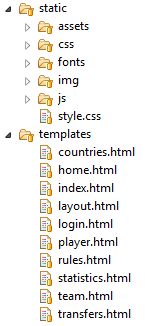
Templates and Static folders
As you see in the figure above, there are html files for each entity and additionally home page and also we have master page called “layout.html”. css files are placed in the static folder.
Under the database there is a dump.sql file that consists of sql dump and some initial values for tables. init_db function takes this file and execute in database to initialize database.
There is folder called classes that includes entity classes and operations.
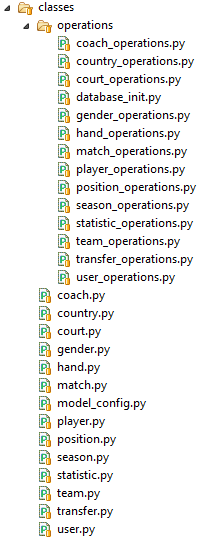
Classes
Finally there is module called admin. In the admin module all insert update delete operations are done. Since it is a seperate module it has templates/ folder its own and also has server.py files.
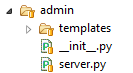
Admin Module
In the templates folder under the admin module admin pages are placed. All admin operations are done in the server.py
We used admin_required function to give permission only authorized users.
Since it is a different module it has own route and own application called ‘admin’.
@admin.route('/')
@admin_required
def admin_page():
    return render_template('admin.html')
We defined all entities operations in here, country, team, player, coach etc. For instance we defined country page as below:
@admin.route('/country', methods=['GET','POST'])
It’s route is seen as ‘/country’ since it is in admin module its real url is ‘admin/country/’
We defined methods that http we used, because flask uses ‘GET’ as a default and if you do not specify ‘POST’ method you can not use it.
Listing countries and deleting a country are done by GET method and updating, adding country are done by POST method.
We used a page to handle both add and edit operations in all entities only the url is changed according to operation
@admin.route('/country/add')
@admin.route('/country/<int:key>')
@admin_required
def country_edit_page(key=None):
    store = country_operations()
    country = store.get_country(key) if key is not None else None
    now = datetime.datetime.now()
    return render_template('country_edit.html', country=country, current_time=now.ctime())
If the url is ‘/country/add’ it calls ‘country_edit.html’ with empty country object, if the url is ‘/country/<objectid>’ then it calls ‘country_edit.html’ with country object registered in database with objectid in url. First one is add page and the second is update page.